API Reference
Note: All shapes (
points3D,lines3D,lineStrips3D,triangles3D,planes3D,polygons3D,gridPlanes3D,cubes3D) share the same API. The methods below work for all shape types.
Shapes
Every factory returns a shape. Its .data takes your points and returns them transformed: each point keeps its fields and gains rotated and projected, and each shape gains a centroid.
| Shape | SVG element | Input | .draw() | ccw |
|---|---|---|---|---|
points3D | <circle> | Datum[], a list of points | ❌ | ❌ |
lines3D | <line> | Datum[][], a list of point pairs | ✅ | ❌ |
lineStrips3D | <path> | Datum[][], a list of point lists | ✅ | ❌ |
triangles3D | <path> | Datum[][], a list of 3 point lists | ✅ | ✅ |
planes3D | <path> | Datum[][], a list of 4 point lists | ✅ | ✅ |
polygons3D | <path> | Datum[][], a list of N point lists | ✅ | ✅ |
gridPlanes3D | <path> | Datum[], a flat grid of points | ✅ | ✅ |
cubes3D | <path> | Datum[][], a list of 8 vertex lists | ✅ | ✅ per face |
iso3D | <path> | IsoBoxSpec[], a list of boxes | ❌ | ❌ |
axes3D | <path> | AxesSpec, the domain and ticks per axis | ✅ | ✅ per wall |
The points of a triangle, plane or polygon go in counter-clockwise order. ccw tells the front from the back face. points3D has no .draw(): draw it, or a lines3D as <line> elements, from the projected coordinates.
points3D()
Points. .data takes a list of points and returns one point per datum.
lines3D()
Lines. .data takes a list of point pairs and returns one line per pair; .draw draws one as a path, or put a <line> on its projected ends.
lineStrips3D()
Line strips. .data takes a list of point lists and returns one open polyline per list.
triangles3D()
Triangles. .data takes a list of three point lists and returns one triangle per list, with ccw set when it faces the camera.
planes3D()
Planes. .data takes a list of four point lists and returns one plane per list, with ccw.
polygons3D()
Polygons. .data takes a list of point lists of any length, at least three, and returns one closed polygon per list, with ccw.
gridPlanes3D()
Grid planes. .data takes a flat list of points, .rows points per row, and returns one quad per grid cell, with ccw. All rows have the same length.
cubes3D()
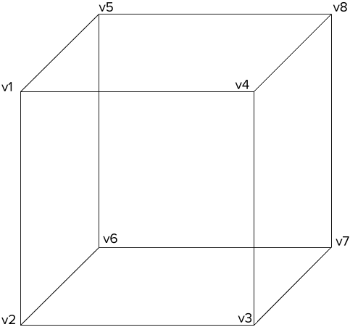
Cubes. .data takes a list of eight point lists and returns one cube per list, with its six faces: front, back, left, right, top and bottom, each with ccw. The eight vertices go in this order, or let box build them:
Camera
camera3D()
A camera without data: the scale, origin, rotation, rotation center and perspective of a scene. Shapes hang on it with .camera(), so turning the camera turns them all, and the same camera hands its projection to a canvas or to WebGL. It has the methods of a shape that set and read the view, but no accessors, no .data and no .draw.
import { camera3D, cubes3D, axes3D, projectPositions } from "d3-3d";

const camera = camera3D().scale(40).origin({ x: 480, y: 250 });
const bars = cubes3D().camera(camera);
const box = axes3D().camera(camera);

camera.rotateY(yaw).rotateX(pitch); // turns the bars and the box

// SVG
svg.selectAll("path").data(faces).join("path").attr("d", bars.draw);

// Canvas
context.fill(new Path2D(bars.draw(face)));
projectPositions(positions, camera.matrix(), screen);

// WebGL
gl.uniformMatrix4fv(
  matrixLocation,
  false,
  camera.matrix({ width, height, depth }),
);
Core Methods
.data(data)
Transform and compute properties for your data: rotate and project every point. Your fields stay on every point, the fields of a shape's array stay on the shape (see Data on a shape), and the result gains:
rotated: Point3D, the rotated point, on every point;projected: Point2D, the point on the screen, on every point;centroid: Point3D, the center of the shape;ccw: boolean, whether a polygon faces the camera.
See Computed properties.
const triangles = triangles3D()
  .scale(100)
  .rotateY(Math.PI / 4);

const result = triangles.data([
  [
    { x: 0, y: 0, z: 0 },
    { x: 1, y: 0, z: 0 },
    { x: 0, y: 1, z: 0 },
  ],
]);

result[0].centroid; // { x, y, z }
result[0].ccw; // boolean
result[0][0].rotated; // { x, y, z }
result[0][0].projected; // { x, y }
.draw(shape)
Draw the SVG path for a shape, one item of the .data result, as a path string such as "M0,0L1,0L0.5,1Z". Not on points3D.
svg
  .selectAll("path")
  .data(triangles.data(data))
  .join("path")
  .attr("d", triangles.draw);
.unproject(point, planePoint, planeNormal)
The world point on a plane under a screen point, or null when the plane is seen edge-on or the ray from the eye meets it only behind the eye. The plane runs through planePoint with the normal planeNormal, which need not be normalized. It is the inverse of .data for points on a known plane: what dragging along a floor or reading the coordinates under the pointer needs.
const cubes = cubes3D()
  .scale(40)
  .origin({ x: 480, y: 250 })
  .rotateX(-0.5)
  .rotateY(0.6);

svg.on("pointermove", (event) => {
  const [x, y] = d3.pointer(event);
  // The floor: the plane y = 0.
  const floor = cubes.unproject(
    { x, y },
    { x: 0, y: 0, z: 0 },
    { x: 0, y: 1, z: 0 },
  );
});
.matrix()
The projection as a column-major 4×4 Float32Array, for a WebGL uniform or for projectPositions. It maps a world point to its screen x and y, and its rotated z as the depth: a larger z is nearer the viewer. Use it when the SVG DOM is too slow for the number of points: .data builds an object per point, the matrix projects millions of them on the GPU.
Given { width, height, depth }, it maps to clip space instead, ready for gl_Position: x and y from -1 to 1 with y up, and the depth from -1 at the near side to 1 at the far side. width and height are the size of the canvas in the pixels of origin and scale, depth the radius of the scene around the rotation center, in world units; without it, z is 0. With a perspective the matrix has a w, and the depth has to be less than the distance of the eye.
const camera = camera3D()
  .scale(40)
  .origin({ x: 480, y: 250 })
  .rotateX(-0.5)
  .rotateY(0.6);

gl.uniformMatrix4fv(
  matrixLocation,
  false,
  camera.matrix({ width: 960, height: 500, depth: 2 }),
);uniform mat4 u_matrix; // camera.matrix({ width, height, depth })
attribute vec3 a_position;
void main() {
gl_Position = u_matrix * vec4(a_position, 1.0);
}.camera(camera)
Share the view of a camera3D() or another shape: turning, scaling or moving either changes both. Call it before the other setters, the shape gives up the view it had.
.viewDirection()
The direction from the scene towards the viewer, a unit vector in world coordinates: which side of a box shows, which end of a grid is near, the normal of a plane that faces the camera. The rotated depth of a point p is dot(viewDirection, p − rotationCenter) + rotationCenter.z. In perspective the eye sits at rotationCenter + perspective · viewDirection.
const v = camera.viewDirection();
const topShows = v.y < 0; // up is -y, as on the screen
const facing = camera.unproject(pointer, grabbed, v); // drag in the plane that faces the camera
Configuration Methods
Every setter returns the shape, so the calls chain. Called without an argument, it returns the current value.
.x(accessor)
Set the x accessor, a function of the point. Default: (p) => p.x.
.y(accessor)
Set the y accessor. Default: (p) => p.y.
.z(accessor)
Set the z accessor. Default: (p) => p.z.
.scale(scale)
Set the scale for the projected points. Default: 1.
.rotateX(angle)
Set the angle for the x rotation, in radians. Default: 0.
.rotateY(angle)
Set the angle for the y rotation, in radians. Default: 0.
.rotateZ(angle)
Set the angle for the z rotation, in radians. Default: 0.
.rotationCenter(point)
Set the rotation center, the 3D point the rotations pivot around, unlike .origin, which places the scene on the screen. Default: { x: 0, y: 0, z: 0 }.
// Pivot around (50, 50, 0) instead of the world origin.
triangles3D()
  .rotationCenter({ x: 50, y: 50, z: 0 })
  .rotateY(Math.PI / 2);
.origin(origin)
Set the 2D rendering origin. Default: { x: 0, y: 0 }.
.perspective(distance)
Set the distance of the eye from the rotation center, in world units, for a perspective view, like CSS perspective. The default, Infinity, is orthographic. The plane through the rotation center keeps the scale; nearer things grow and farther ones shrink, by distance / (distance − (rotated.z − rotationCenter.z)). A small distance is a strong perspective. The scene has to lie in front of the eye: WebGL clips the rest, SVG and a 2D canvas cannot.
sort keeps working, since the rotated z is still the depth along the view axis. ccw winds on the screen, .unproject() casts its rays from the eye, and a face faces the eye where dot(normal, eye − vertex) > 0. Circles keep their size: scale a radius by the factor above to shrink the far ones. iso3D stays orthographic.
const camera = camera3D()
  .scale(80)
  .origin({ x: 480, y: 250 })
  .rotateY(0.6)
  .perspective(6);
.rows(rows)
Set the points per row (gridPlanes3D only). A grid comes as a flat list, so the shape needs the row length to build its quads. Default: 1.
const grid = gridPlanes3D()
  .rows(3)
  .data([
    { x: 0, y: 0, z: 0 },
    { x: 1, y: 0, z: 0 },
    { x: 2, y: 0, z: 0 }, // row 0
    { x: 0, y: 0, z: 1 },
    { x: 1, y: 0, z: 1 },
    { x: 2, y: 0, z: 1 }, // row 1
  ]);
Computed properties
centroid
The mean of the rotated points of a shape, on every shape: sort by it, put a label on it, or hit-test around it.
ccw
Whether a polygon winds counter-clockwise on the screen, by the shoelace formula on the projected points, so it holds in a perspective too. A counter-clockwise polygon faces the camera: skip or shade the others for back face culling. On triangles3D, planes3D, polygons3D, gridPlanes3D, the faces of cubes3D and the walls of axes3D.
const front = triangles3D()
  .data(mesh)
  .filter((t) => t.ccw);
rotated
The rotated 3D point, on every point.
projected
The point on the screen, orthographic or in perspective, on every point.
Utility Functions
sort(a, b)
Sort shapes by depth (painter's algorithm): a comparator for anything with a centroid, back to front. In a perspective too, the rotated z is the depth.
svg
  .selectAll("path")
  .data(triangles.data(data).sort(sort))
  .join("path")
  .attr("d", triangles.draw);
Things that stand on one floor, bars or buildings, sort by their footprint: give each the centroid of its bottom face. The centre of a tall box sits high up, so seen from above it would paint over a short box in front of it. A long line sorts by its middle; cut it with strips so every piece sorts on its own depth.
function sort<T extends HasCentroid>(a: T, b: T): number;

interface HasCentroid {
  centroid: { z: number };
}
ccw(polygon)
Whether a transformed polygon winds counter-clockwise on the screen, which means it faces the camera, in a perspective too.
centroid(polygon)
The mean of the rotated points of a transformed polygon.
transform(data, options)
Rotate and project a list of points: what .data does under the hood.
orthographic(point, options)
Project a rotated point onto the screen: { origin, scale } in, Point2D out.
perspective(point, options)
Project a rotated point as seen from an eye distance in front of the rotation center: { origin, scale, rotateCenter, distance } in, Point2D out. An infinite distance is orthographic.
projectPositions(positions, matrix, out?)
Project packed x, y, z triples through a .matrix() into a Float32Array of screen x, screen y and depth. x and y are divided by the w of a perspective matrix, the depth stays the rotated z. Reuse out to redraw a large point cloud on a canvas without allocating.
const positions = new Float32Array(data.flatMap((d) => [d.x, d.y, d.z]));
const screen = new Float32Array(positions.length);
const camera = camera3D().scale(40).origin({ x: 480, y: 250 });

function frame(angle: number) {
  projectPositions(positions, camera.rotateY(angle).matrix(), screen);
  context.clearRect(0, 0, width, height);
  for (let i = 0; i < screen.length; i += 3) {
    context.fillRect(screen[i] - 1, screen[i + 1] - 1, 2, 2);
  }
}
normal(polygon)
The unit normal of a polygon by Newell's method, on the side ccw reports: outwards on the faces of cubes3D, along viewDirection where a face faces the camera, or towards the eye in perspective. A polygon without an area gets the zero vector.
const sun = { x: 0.5, y: -0.7, z: 0.5 }; // up is -y
const light = (face) => {
  const n = normal(face);
  return Math.max(0.2, n.x * sun.x + n.y * sun.y + n.z * sun.z);
};
box(spec)
The eight corners of a box in the order cubes3D expects, standing on { x, y, z } with its width, depth and height, upwards towards -y. topWidth and topDepth taper the top: zero width makes a ridge, zero size an apex.
const bars = data.map((d) =>
  box({ x: d.x, y: 0, z: d.z, width: 1, height: d.value, depth: 1 }),
);
cubes3D().data(bars);
sphere(spec, segments)
The triangles of a sphere for triangles3D, around { x, y, z } with its radius. segments steps run around the y axis and half as many bands, rounded up, from pole to pole. Every triangle faces outwards: its normal points out and ccw tells the front of the sphere from its back.
const triangles = triangles3D();
const ball = triangles
  .data(sphere({ x: 0, y: 0, z: 0, radius: 1 }, 24))
  .filter((t) => t.ccw);
svg.selectAll("path").data(ball).join("path").attr("d", triangles.draw);
lathe(profile, segments)
The triangles of a surface of revolution, for triangles3D. The profile is a list of { x, y }, the radius and the height, turned around the y axis in segments steps. A point with radius 0 closes the surface there, so a profile from the axis to the axis is a solid. Run it upwards, from a large y to a small one, and every triangle faces outwards: its normal points out and ccw tells the outside from the inside.
// A cylinder standing on y = 0: from the middle of the bottom out, up the
// side and in again to the middle of the top.
const cylinder = lathe(
  [
    { x: 0, y: 0 },
    { x: r, y: 0 },
    { x: r, y: -h },
    { x: 0, y: -h },
  ],
  24,
);

const triangles = triangles3D();
const faces = triangles.data(cylinder).filter((t) => t.ccw);
svg.selectAll("path").data(faces).join("path").attr("d", triangles.draw);
strips(points, size)
Cut a polyline into strips of size points that share their end points, the last one shorter if the points run out, so every piece of a long line sorts on its own depth. A size of 2 gives the segments, for lines3D.
const orbit = lineStrips3D().data(strips(points, 6));
svg
  .selectAll("path")
  .data([...orbit, ...planets].sort(sort))
  .join("path");
catmullRom(points, steps)
The Catmull–Rom spline through 3D points, steps samples per segment, for lineStrips3D. It starts on the first point and ends on the last.
const curve = lineStrips3D();
path.attr("d", curve.draw(curve.data([catmullRom(knots, 16)])[0]));
axisSpec(scale, count?)
One axis of axes3D from a d3 scale: its domain and about count of its ticks. Call .nice() on the scale first, so the box ends on a tick. The scale is anything with domain() and ticks(count).
Isometric scenes
iso3D()
iso3D draws an isometric scene. Where the other shapes project a polygon, it hands out the affine frame of a face: the SVG matrix that carries the local coordinates of the face onto the screen. Because the projection is orthographic, the image of a plane stays affine, so the browser rasterises the transform and the projection itself costs nothing at runtime. For the same reason iso3D is always orthographic and ignores .perspective().
import { iso3D, sort } from "d3-3d";

// The isometric view: the angles that map the world axes onto the 120
// degree screen axes.
const iso = iso3D()
  .rotateX(Math.atan(Math.SQRT2))
  .rotateZ(Math.PI / 4)
  .scale(Math.sqrt(1.5));

// Boxes: the visible side and the top face, plus the frame of every face.
const boxes = iso.data([{ x: 0, y: 0, z: 0, w: 100, d: 80, h: 20, r: 6 }]);

// A face: everything inside the group is drawn in the local coordinates
// of the face.
const top = iso.plane({
  origin: { x: 0, y: 0, z: 20 },
  u: { x: 1, y: 0, z: 0 },
  v: { x: 0, y: 1, z: 0 },
});

svg.append("g").attr("transform", top.matrix).append("text").text("Hello");
A box is { x, y, z, w, d, h, r }: the corner, the extent along the three axes and the corner radius of its plan outline. The depth of a box is the z of its rotated centre, so the boxes can be sorted with the same sort() utility as every other shape.
See the office tower example for a complete scene.
.data(boxes)
The boxes with their wall, top and face frames.
.plane(spec)
The affine frame of a face: { matrix }.
.path(points)
The path of a 3D polyline.
.project(points)
The screen coordinates of 3D points.
.frame(points)
The viewBox that frames a projected scene.
Axes
axes3D()
axes3D draws the box of a 3D chart: six walls with gridlines and three axes with their ticks. It works in data units: hand it the domain and the ticks of every axis, and give it the same accessors as the shapes it frames, so the box and the data turn as one.
import { axes3D, axisSpec } from "d3-3d";
import { scaleLinear } from "d3";

// Every axis spans the box from -1 to 1.
const x = scaleLinear().domain([0, 10]).range([-1, 1]).nice();
const y = scaleLinear().domain([0, 4]).range([-1, 1]).nice();
const z = scaleLinear().domain([-2, 2]).range([-1, 1]).nice();

const box = axes3D()
  .scale(100)
  .origin({ x: 480, y: 250 })
  .x((d) => x(d.x))
  .y((d) => -z(d.z)) // data z is up, the screen y grows downwards
  .z((d) => y(d.y));

const spec = { x: axisSpec(x, 5), y: axisSpec(y, 5), z: axisSpec(z, 5) };

// The walls behind the data, with their gridlines.
svg
  .selectAll("path.wall")
  .data(box.data(spec).filter((wall) => !wall.ccw))
  .join("path")
  .attr("class", "wall")
  .attr("d", box.draw);

// The tick labels of the three axes, pushed away from the box.
const ticks = box
  .axes(spec)
  .flatMap((edge) => edge.map((tick) => ({ tick, edge })));

svg
  .selectAll("text.tick")
  .data(ticks)
  .join("text")
  .attr("class", "tick")
  .attr("x", (d) => d.tick.projected.x + d.edge.normal.x * 10)
  .attr("y", (d) => d.tick.projected.y + d.edge.normal.y * 10)
  .attr("text-anchor", (d) =>
    d.edge.normal.x > 0.3 ? "start" : d.edge.normal.x < -0.3 ? "end" : "middle",
  )
  .text((d) => d.tick[d.edge.axis]);
A spec holds one { domain, ticks } per axis. A wall is the list of its four corners. It has ccw set when it faces the camera, so the walls behind the data are the ones without it. axes3D winds the corners for the accessors, so this holds whatever the accessors and the domains: a negated axis or a reversed domain mirrors the box, and the winding follows.
An axis lies on an edge between a wall that faces the camera and one that does not, so it runs along the outline of the box, outside the data, and the edges below the box come first, then the ones left of it. Every tick keeps its value under the axis key, tick[edge.axis], and normal is the unit screen vector away from the box, square to the edge.
See the scatter plot for a complete chart.
.data(spec)
The six walls, x lo and hi, y lo and hi, z lo and hi, with ccw, centroid and grid. Every wall names the axis it stands across and its side, 0 at the first value of the domain and 1 at the last, so the floor of a chart whose data z is up is the wall with axis === 'z'.
.draw(wall)
The path of a wall: its outline and its gridlines.
.axes(spec)
The three axes x, y, z, each a list of ticks with its axis, normal, sides and chosen.
.edges(spec)
The four edges along every axis, four x, four y, four z, in the same form as .axes. sides names the edge by the ends of the two other axes it runs at, 0 at the first value of their domains and 1 at the last, and chosen marks the edge .axes puts the axis on. A chart that draws the labels of every edge and shows only the chosen ones can fade an axis from one edge to the next as the camera turns.
A wall seen exactly edge on faces neither way, so a camera level with the box keeps every axis on its edge instead of letting it flicker between the floor and the ceiling.
Types
import type { Point3D, Point2D, TransformedPoint } from "d3-3d";Point3D
type Point3D = { x: number; y: number; z: number };Point2D
type Point2D = { x: number; y: number };TransformedPoint
A datum after .data: your fields plus the rotated and the projected point.
type TransformedPoint<T> = T & { rotated: Point3D; projected: Point2D };AxesSpec
The three axes of a chart box, the input of axes3D.
interface AxesSpec {
  x: AxisSpec;
  y: AxisSpec;
  z: AxisSpec;
}
AxisSpec
One axis in data units: its extent, from the first to the last value of domain, and the values of its ticks.
interface AxisSpec {
  domain: number[];
  ticks: number[];
}
IsoBoxSpec
An axis aligned box in world space, the input of iso3D.
interface IsoBoxSpec {
  x: number;
  y: number;
  z: number;
  w: number;
  d: number;
  h: number;
  r?: number;
}
IsoPlaneSpec
A rectangle in world space: its corner and the two vectors that span it.
interface IsoPlaneSpec {
  origin: Point3D;
  u: Point3D;
  v: Point3D;
}